
Free Trading Journal Spreadsheet Template (Excel)
Short answer: download the free template below. You type in each trade, and it works out the P&L, risk, R and drawdown, then fills a dashboard with charts: your balance curve, daily P&L, results by setup, wins and losses, and how your trades spread across R.
Download the trading journal template (.xlsx)
No sign-up and no email needed. It comes with 41 made-up example trades so you can see it working; delete them when you start.
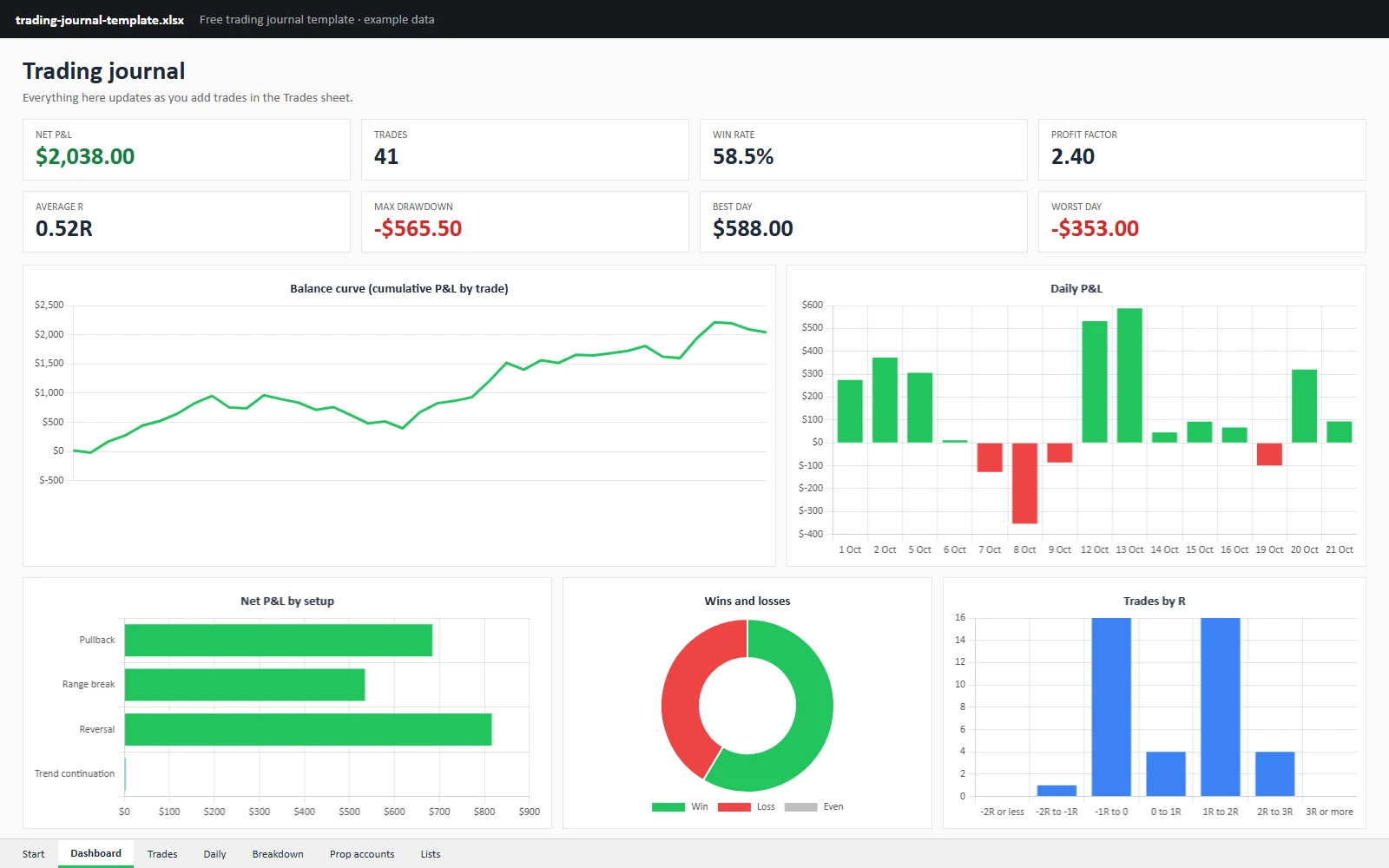
The template’s Dashboard sheet with its made-up example trades.
What’s in the template
| Sheet | What it does |
|---|---|
| Start | How to use it, with links to every sheet |
| Dashboard | 8 figures and 5 charts that update as you add trades |
| Trades | One row per trade, with drop-downs; P&L, risk, R, result, running total and drawdown work themselves out |
| Daily | One row per trading day: trades, net P&L, win rate, running total |
| Breakdown | Results by setup, session, weekday and account, plus how many trades ended in each band of R |
| Prop accounts | Fees, resets, payouts, net and return on cost for each account, with a chart |
| Lists | Your accounts, setups, sessions and mistakes for the drop-downs, and dollars per point for common futures |
The dashboard
| Figure or chart | What it shows |
|---|---|
| Net P&L, trades, win rate | The basics, after commission |
| Profit factor | Money won ÷ money lost |
| Average R | What a trade made on average, measured against its risk |
| Max drawdown | The deepest fall from a previous high |
| Best and worst day | Your biggest up and down days |
| Balance curve | Your running total, trade by trade |
| Daily P&L | Each trading day, green up and red down |
| Net P&L by setup | Which setups made and lost money |
| Wins and losses | How many trades won, lost or broke even |
| Trades by R | How your results spread, from −2R or worse to +3R or more |
The charts follow your data as it grows: new trades, new days and new setups show up by themselves.
The Trades sheet, column by column
| Column | What to enter | Example |
|---|---|---|
| Date, Time | When you entered | 2026-10-06, 09:42 |
| Account | From your list (drop-down) | Example Funded 50K |
| Symbol | The contract (drop-down) | MNQ |
| Side | Long or Short | Long |
| Qty | Contracts | 3 |
| Entry / Exit | Average entry and exit price | 28,644.00 / 28,713.00 |
| Stop / Target | Where your stop and target were | 28,614.00 / 28,734.00 |
| Commission | Round trip, all contracts | 3.00 |
| Setup, Session | From your lists (drop-downs) | Pullback, Open |
| Followed plan, Mistake | Yes or No, and what went wrong | Yes, None |
| Notes | What you saw and why you acted | Waited for the retest |
| $ per point | Worked out from the symbol | 2 |
| P&L | Worked out | $411.00 |
| Risk | Worked out: distance to the stop × qty × $ per point | $180.00 |
| R | Worked out: P&L ÷ risk | 2.28R |
| Result, Cum P&L, Drawdown | Worked out | Win, running total, fall from the high |
Columns you type in are white; the grey ones work themselves out.
How the formulas work
- P&L = (exit − entry) × contracts × dollars per point − commission. For a short trade, entry − exit.
- Risk = distance from entry to stop × contracts × dollars per point.
- R = P&L ÷ risk. A trade that made twice what it risked is +2R; a full stop-out is −1R.
- Drawdown = how far the running total sits below its highest point so far.
- Return on cost (Prop accounts) = payouts ÷ (fees + resets).
How to get the most from a spreadsheet journal
- Fill it in the same day. A week of trades is hard to remember and easy to skip.
- Always enter the stop, even when you moved it. Without it there’s no R.
- Keep your lists short. A handful of setups you can tell apart beats twenty you can’t.
- Review once a week on the Dashboard and Breakdown sheets, and look at what repeats.
When a spreadsheet stops being enough
A spreadsheet is free and flexible, but every trade is typed by hand, and things like MAE and MFE (how far price went against and for you during the trade) aren’t practical to fill in. If you trade on Sierra Chart, Parallax Trading Journal imports each trade the moment the position closes, with its stop, target, MAE, MFE and P&L path, and keeps your data on your own PC. It has a 7-day free trial. See the journal.
Not sure whether you need a paid journal at all? Read Is There a Free Trading Journal for Sierra Chart?
Frequently asked
Does the template work in Google Sheets?
The sheets, drop-downs and formulas work in Google Sheets: upload the .xlsx to Google Drive and open it with Google Sheets. The charts are made for Excel and may need to be added again in Google Sheets.
How do I remove the example trades?
On the Trades sheet, select the white cells of the example rows (their Notes say “Example row”) and press Delete. Leave the grey columns: they hold the formulas.
Can I change it?
Yes, it’s yours to change. Add your own setups, sessions and accounts on the Lists sheet, and any symbol you trade with its dollars per point.
Is the template really free?
Yes, with no sign-up. It’s made by Parallax, the makers of a trading journal for Sierra Chart. The example figures are made up, and nothing in it is trading advice.