Trading Journal for Apex Trader Funding Accounts
Short answer: get your Apex trades into a journal from the platform you trade on, then set each account up with Apex’s rules. In Parallax, trades from Sierra Chart come in on their own as each position closes, and Tradovate or NinjaTrader trades come in from their export files. Each Apex account then gets its own card under Reports → Prop accounts, with the drawdown room left, the checks for a payout, and what the account has cost and paid you.
What to track on an Apex account
Apex accounts are judged on more than profit. Each one has its own drawdown threshold, and funded accounts have checks to pass before a payout. A journal for Apex accounts keeps these per account:
| Track | Why it matters |
|---|---|
| Drawdown threshold and room left | How far the account can fall before it’s closed |
| Daily loss limit days | Days that hit the limit and ended early |
| Profit target (evaluation) | How far there is still to go |
| Trading days and best day since the last payout | What the payout checks look at |
| Evaluation, reset and activation fees | What each account cost |
| Payouts received | What each account paid you |
Apex’s rules change from time to time, so the numbers belong in one place you can update, not spread across a spreadsheet.
Getting your Apex trades in
Which way depends on the platform you trade your Apex account on:
- Sierra Chart (with Rithmic): Parallax reads your trades from Sierra Chart as each position closes, so there’s nothing to export. More in Exporting Trades from Sierra Chart.
- Tradovate: export the Orders and Cash History reports and import them together, so every fee and your stop orders come across. Step by step in Trading Journal for Tradovate.
- NinjaTrader 8: export the Trades report as CSV and import it. Step by step in Trading Journal for NinjaTrader.
Each Apex account comes in as its own account. If you copy trades across several Apex accounts, each one keeps its own trades, results and limits.
Apex’s rules in the journal
In Settings → Accounts & commissions, click Prop firm next to an account and turn on Prop firm account. Pick Apex Trader Funding as the firm, then the account size, the stage (evaluation or funded) and the drawdown type (end of day or intraday). Parallax fills in Apex’s numbers for that account, and every number can be changed, so you can match Apex’s current rule page whenever it changes.
Reports → Prop accounts then shows a card for each account:
- a verdict: Passed, Payout ready, In progress, Not ready for payout or Drawdown breached;
- the balance, the threshold and the room left, with a bar that turns amber and then red as room runs out;
- the closing balance each day against the threshold;
- the checks for passing or for a payout, each with its figures.
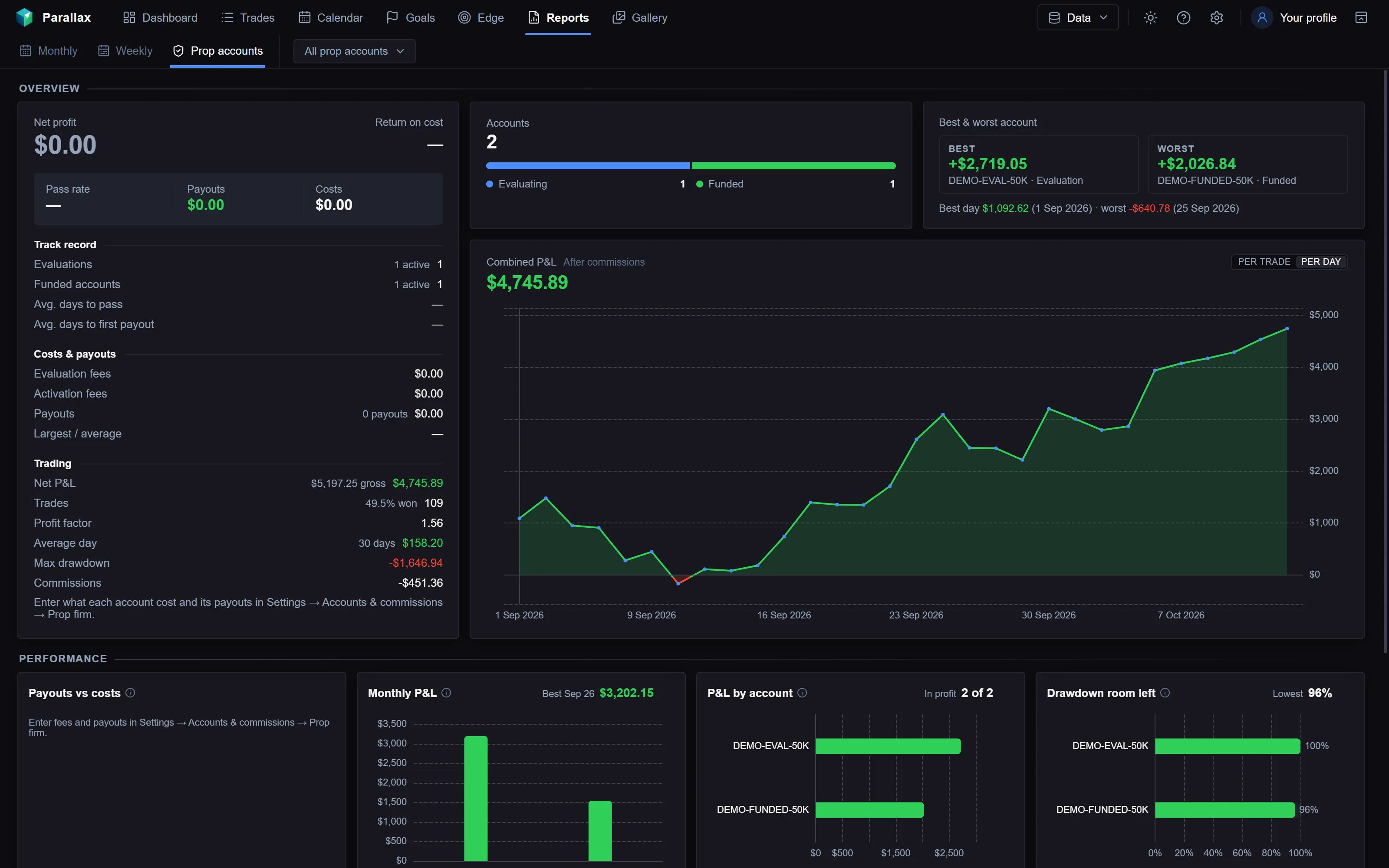
The Prop accounts report in Parallax, from a made-up demo journal.
The room left is worked out from your trades, including how far each trade went against you. Apex tracks your account tick by tick, so its own dashboard has the final figure.
Fees and payouts across all your Apex accounts
Add each account’s evaluation fee (resets included), activation fee and payouts once. The report adds them up across every account, live and closed, so you can see what your Apex accounts cost in total, what they paid, and the return on cost. More on this in Prop Firm Trading Journal.
The simulator can also replay your own trades through an Apex evaluation and funded account, to see how often the same trades would have passed and reached a payout.
Frequently asked
Does Parallax work with Apex Trader Funding?
Yes, for Apex accounts traded through Sierra Chart, Tradovate or NinjaTrader 8. Apex Trader Funding is a built-in firm in the prop account settings, and you can change any of its numbers.
Can I journal many Apex accounts at once?
Yes. Each account keeps its own trades, rules and card in the report, and the report also shows all of them together.
What if Apex changes its rules?
Change the numbers in the account’s prop firm settings, or save your own version as a preset under Settings → Accounts & commissions → Prop firm presets. Apex’s own rule pages are the final word.
Does it track intraday drawdown?
Yes. Choose Intraday as the drawdown type and the threshold rises with the account’s highest balance during each trade, not only at the close.
Parallax runs on Windows and costs $16 a month or $149 a year, with a 7-day free trial. See the journal or pricing.
Apex Trader Funding is a trademark of its owner. Parallax isn’t affiliated with it.