
Prop Firm Trading Journal: Track Fees, Payouts and Drawdown Across Accounts
Short answer: yes. A prop firm trading journal records more than your P&L. It also keeps what each account cost you (evaluation, reset and activation fees), what it paid out, and how much drawdown room each account has left. You can track this in a spreadsheet, or use a journal with prop firm accounts built in, such as Parallax.
Why prop firm trading needs its own kind of journal
Trading a prop firm account is different from trading your own money in three ways:
- Accounts come and go. You might run an evaluation, reset it, pass to a funded account, lose it and start again. Over a year that can be a dozen accounts at more than one firm.
- Every account has a cost. Evaluation fees, resets and activation fees add up. Your trading P&L can look good while the money you actually took home is lower, or negative.
- Each account has its own limit. Most firms set a maximum drawdown, and many use a trailing drawdown that moves up as the account grows. What matters day to day is how much room is left before that limit.
A normal journal shows the trades. A prop firm journal also shows the business around them.
What to track for every prop account
| Group | Track | Why it matters |
|---|---|---|
| Costs | Evaluation fee and every reset | The part most traders forget to add up |
| Costs | Activation or monthly data fees | Funded accounts keep costing after you pass |
| Results | Trading P&L on the account | How the trading itself went |
| Results | Payouts received, with dates | The money you actually took home |
| Results | Return on cost | Payouts compared with everything the account cost |
| Status | Evaluation, funded or closed | Where each account stands today |
| Status | How long the evaluation took | Shows how your evaluations usually go |
| Status | Drawdown room left, daily loss limit | How much room you have before the firm’s limit |
| All accounts | Combined P&L and costs | The whole picture across firms |
| All accounts | Best and worst account, P&L by month | The trend instead of one good week |
Option 1: a spreadsheet
A spreadsheet works if you keep it up. Make one row per account, plus a total row. Add a second sheet for trades if you want P&L by account. A layout to start from (example figures):
| Account | Firm | Type | Started | Fees | Resets | Payouts | Status |
|---|---|---|---|---|---|---|---|
| Firm A 50K Eval 1 | Firm A | Evaluation | 2 Sep | $165 | $80 | $0 | Closed |
| Firm A 50K Eval 2 | Firm A | Evaluation | 20 Sep | $165 | $0 | $0 | Passed |
| Firm A 50K Funded 1 | Firm A | Funded | 4 Oct | $130 | $0 | $1,200 | Active |
| Total | $460 | $80 | $1,200 |
The weak spots are time and accuracy. You copy every trade and every fee by hand, and drawdown room has to be recalculated every day, so it’s easy to fall behind.
Option 2: a journal with prop firm accounts built in
Parallax Trading Journal imports every trade from Sierra Chart the moment the position closes, so the trading side fills itself. Its Prop accounts report adds the business side:
- evaluation and activation fees, payouts and return on cost, per account and combined;
- each account’s status, with your track record of evaluations and funded accounts;
- drawdown room left on each account;
- combined P&L across accounts, best and worst account, and monthly P&L.
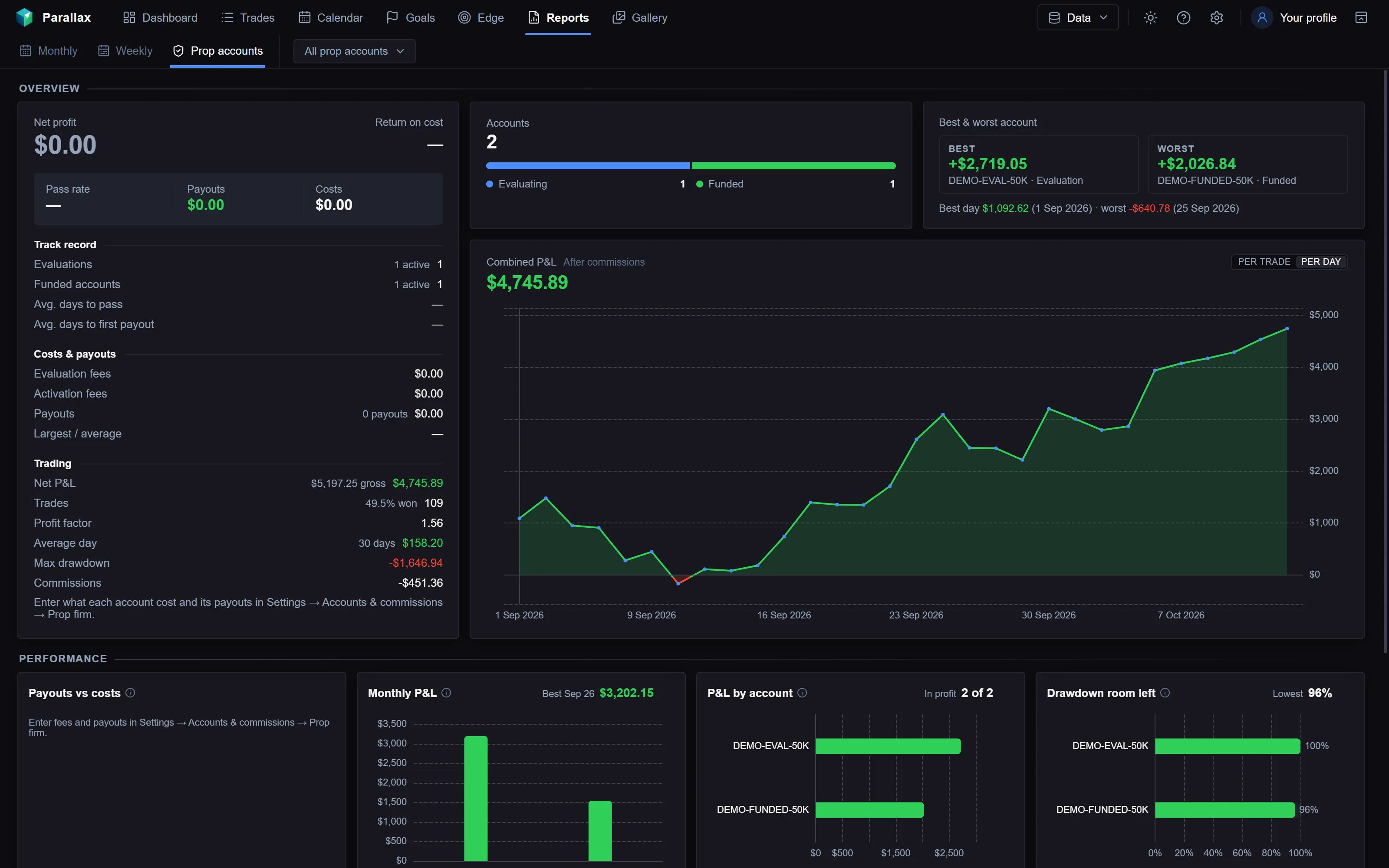
The Prop accounts report in Parallax, from a made-up demo journal.
You enter each account’s costs and payouts once in Settings → Accounts & commissions → Prop firm; everything else comes from your trades. Your data stays on your own PC.
The simulator can also replay your own trades through a firm’s evaluation and funded rules, to see how the same trades would have fared under them. See the journal and its 7-day free trial.
Comparing journals in general? Read Best Trading Journal for Sierra Chart in 2026.
Tips for journaling several prop accounts
- Name accounts so you can tell them apart: firm, size and type, for example “Firm A 50K Eval 3”.
- Log costs on the day you pay them, not when you remember. Fees are the part most traders forget.
- Review across accounts, not only one. A pattern such as losing on Fridays shows up faster when every account is in one place.
- Check your firm’s current rules. Drawdown types, daily limits and payout rules differ between firms and change often. A journal can show the numbers, but your firm’s rule page is the final word.
Frequently asked
Is there a trading journal for prop firm traders?
Yes. You can build one in a spreadsheet, or use a journal with prop firm accounts built in. Parallax tracks fees, payouts, return on cost and drawdown room for each account, alongside your trades from Sierra Chart.
How do I track prop firm expenses?
Record every evaluation, reset and activation fee on the day you pay it, per account. Compare the total with your payouts to see your return on cost.
What is return on cost for a prop account?
It compares what an account paid you with what it cost you in fees. Payouts of $1,500 on accounts that cost $500 in total is a 200% return on cost.
Can I journal several prop accounts together?
Yes. Keep each account separate so you can see its own results and limits, and look at all of them combined to see your total P&L, costs and payouts.
Does this work with my prop firm?
Parallax reads trades from Sierra Chart, so it works with any prop account you trade through Sierra Chart, for example Apex accounts on Rithmic. You enter the firm’s fees and payouts yourself. Firms that only offer their own platform aren’t covered.